
We understand Microsoft SharePoint as a place to store documents in the cloud and control access.
SharePoint metadata adds another way to organise and manage those documents. It adds useful information to a document so users can identify what the document is – not just where it is saved. Metadata simply means information about a document.
Types of metadata in SharePoint:
System metadata: Metadata that SharePoint records by default.
You may be familiar with columns such as:
- Created date
- Created by
- Modified date
- Modified by
Custom metadata: Businesses can also create their own custom metadata using columns. For example:
| Department | Document Type | Status | Review Date |
| HR | Policy | Approved | 15 March 2028 |
| Finance | Report | Draft | |
| Operations | Procedure | In Review | 1 December 2027 |
If you are familiar with Microsoft Excel, the concept is similar. Each document is a row, and the columns hold information about that document.
What does metadata let you do?
Without metadata, finding a document often means navigating through folders.
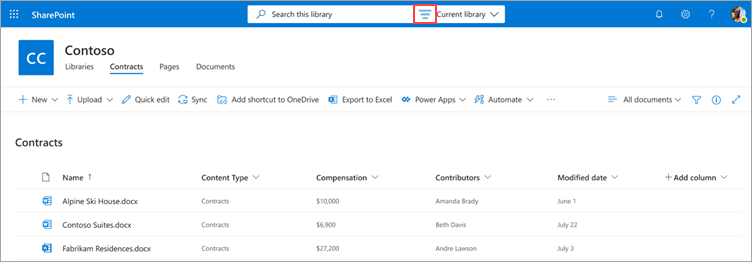
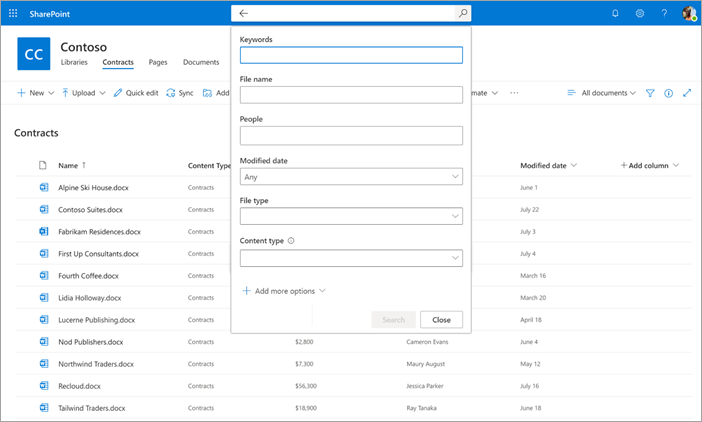
Metadata lets staff sort, filter, group and create different views of the same documents.
For example, you could:
- Show only approved policies.
- Group documents by department.
- Sort contracts by renewal date.
- Show documents due for review.
- Create a view of all active project contracts.
How do staff add metadata?
Custom columns appear alongside documents in a SharePoint library. Staff can select values directly in the library or go through the document’s “Details” pane.
The key is to keep meta-tagging simple. If staff have to complete too many fields, adoption is likely to be poor. Often two or three useful columns are enough.
3 examples:
Policies
A policy library might use:
Department: HR, Finance, Operations
Status: Draft, Approved, Superseded
Review Date: Next review date
Owner: Person responsible
You could then create views for:
- Current approved policies.
- Policies due for review.
- Policies by department.
A workflow could also notify the owner when a review date is approaching.
Contracts
A contract library might use:
Contract Type: Supplier, Customer, Lease
Owner: Responsible manager
Status: Draft, Active, Expired
Renewal Date: Renewal or expiry date
You could view all contracts expiring in the next 90 days, regardless of which folders they are stored in.
Projects
A project library might use:
Project: Project A, B or C
Document Type: Contract, Report, Meeting Minutes, SOW
Project Stage: Planning, Delivery, Complete
Status: Draft, Approved, Final
You could view all active project contracts or all final reports, regardless of which folders they are stored in.
Do metadata tags replace folders in SharePoint?
Metadata does not mean your business has to remove folders structures. You might still have folders for Finance, HR and Operations, while using metadata specifically for policies, contracts or projects.
The useful question is: Do these documents need to be found or managed in more than one way?
When is metadata most useful in SharePoint?
Metadata is most useful for document libraries that need more structure than folders alone can provide. It is also useful where workflows need to act on document information, such as sending review reminders or starting an approval process.
Good examples include:
- Policies and procedures.
- Contracts.
- Project documentation.
- Reports.
- Compliance documents.
- Documents with review or renewal dates.
- Documents moving through approval stages.
When is metadata unnecessary in SharePoint?
- If a library is small and staff rarely need to filter or automate documents, metadata is probably unnecessary admin.
- If staff work through synced SharePoint folders in File Explorer – because they won’t see the SharePoint columns, filters and views in File Explorer.
What are the common ways to set-up custom metadata in SharePoint?
There are three common ways custom metadata can be set up:
- Library columns are created for one library.
- Site columns can be reused across multiple libraries within one SharePoint site.
- Managed metadata where labels are centrally controlled from SharePoint’s Term Store.
Where metadata is driving classification or automated controls, it’s important to consider who should be able to change those fields.
The value of metadata is simple.
Metadata tells SharePoint what the document is, who it relates to, what stage it is at and when something needs to happen next.
For documents that need ongoing management, searching, review or automation, metadata can make SharePoint considerably more useful.
How Podcom can help.
Podcom helps New Zealand businesses manage their SharePoint and Microsoft 365 environments through our vCISO Services. We can assess existing document structures and sharing controls, then develop a practical approach to information governance that supports security without making every day work difficult.